
Reminder Pro Documentation
Official documentation for Reminder Pro, the Discord reminder bot. Learn every feature: one-time and recurring reminders, time formats, pings, embeds, the web dashboard, premium and troubleshooting.
On this page
What is Reminder Pro?
Reminder Pro is a Discord bot that posts scheduled messages in your server. Use it for daily standups, weekly events, raid timers, birthdays, rent and subscription notices, study sessions, community announcements and anything else your members should not forget.
You create reminders with slash commands such as /reminder add, or with a form on the web dashboard. Both work on the same data, so you can switch between them at any time.
Key features
- One-time and recurring reminders: daily, weekly, monthly, yearly or any custom interval.
- Natural time input:
3pm,friday 8pm,01/15 9:30amor2h 30m. - Timezone aware: every server has its own timezone, and members see times in their own local time.
- Pings: notify up to four roles or members, or @everyone.
- Rich embeds: title, color, image, thumbnail, footer and timestamp.
- Skip days and expiration: stay quiet on weekends and stop automatically after an end date.
- Pause and resume: one reminder or all of them at once.
- Web dashboard: create and manage reminders from any browser, with a live preview.
- Staff roles: let moderators manage reminders without giving them Manage Server permission.
How Reminder Pro works
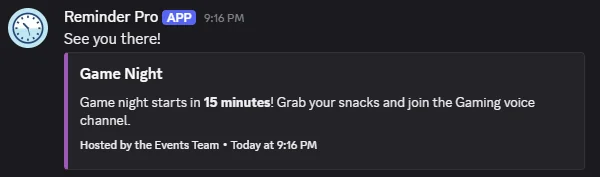
When you create a reminder, the bot stores it and creates a webhook called Reminder Pro in the target channel. At the scheduled time, the reminder is posted through that webhook. This is why reminders can carry their own name and avatar, and why the bot needs the Manage Webhooks permission.
One-time reminders are removed after they are sent. Recurring reminders schedule their next run right after sending and continue until you pause or delete them, or until they expire.
Who uses Reminder Pro
| Community | Typical reminders |
|---|---|
| Gaming servers | Raid and event timers, weekly resets, tournament check-ins |
| Work and project teams | Daily standups, sprint reviews, deadline warnings |
| Study groups and classes | Homework due dates, exam countdowns, study sessions |
| Creators and communities | Stream schedules, giveaways, monthly community calls |
| Friends and families | Birthdays, bills, shared chores |
How these docs are organized
The docs are written to be read in order, like a book, but every page also stands on its own. Use the sidebar to jump to any topic, or search for a word.
| Chapter | What you will learn |
|---|---|
| Getting Started | Invite the bot, permissions, staff roles and timezone |
| Creating Reminders | Every option, time formats, repeats, skip days, expiration and channels |
| Customizing Reminders | Pings, embeds, custom bot name and avatar, delete previous message |
| Managing Reminders | Listing, editing, pausing, deleting and daylight saving time |
| Web Dashboard | Everything you can do from the browser |
| Premium | Plans, limits and activation |
| Reference | Every command, every error message, troubleshooting and FAQ |
Questions
Is Reminder Pro free?
Yes. Every server can use Reminder Pro for free with up to 3 reminders. Premium is optional and raises the limits.
Do I need to know how to code?
No. Everything works with slash commands in Discord or with forms on the web dashboard.