
Daylight Saving Time
Fix Discord reminders that arrive one hour early or late after a daylight saving time change, using the Reminder Pro dst-forward and dst-backward commands.
On this page
Why reminders shift
Daily, weekly and custom reminders repeat after an exact length of time: 24 hours, 7 days, and so on. Daylight saving time (DST) moves your local clock by one hour, but it does not change that exact schedule. So after the change, the reminder appears one hour off on the clock.
Example: in New York, a daily reminder at 9:00 AM keeps firing at the same real moment after the clocks spring forward in March. On the new clock, that moment reads 10:00 AM.
Which reminders are affected
| Reminder type | After a clock change |
|---|---|
| One-time | Unaffected, scheduled for an exact local time |
| Monthly and yearly | Unaffected, they keep their local time |
| Daily, weekly and custom | One hour early or late on the local clock |
Regions without daylight saving time, like most of Asia and Africa, never need to do anything.
Fix it
| Symptom | Command | Dashboard button | Effect |
|---|---|---|---|
| One hour late | /reminder dst-backward | Move 1 hour earlier | Daily, weekly and custom reminders move 1 hour earlier |
| One hour early | /reminder dst-forward | Move 1 hour later | Daily, weekly and custom reminders move 1 hour later |
On the dashboard
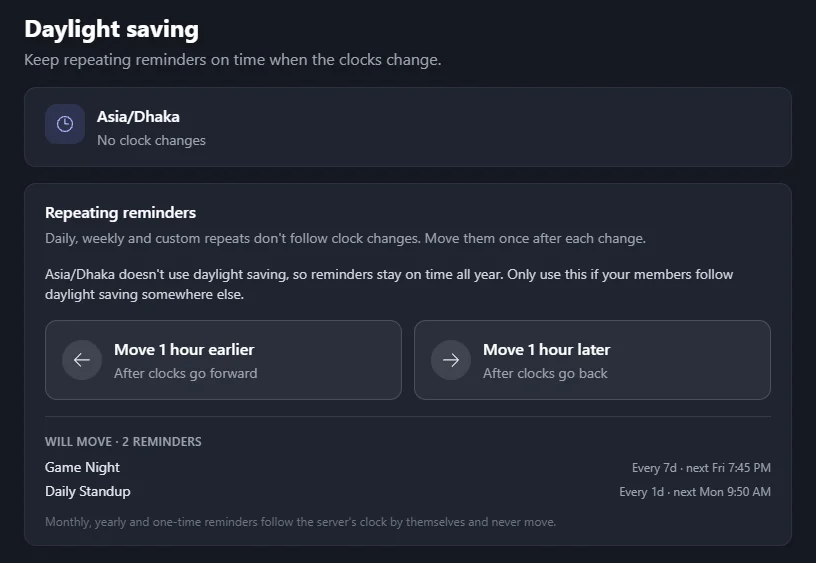
Open Settings > Daylight saving. It shows whether your server timezone changes its clocks, the two buttons, and exactly which reminders will move before you click:
Which reminders move
Both the commands and the dashboard buttons only move reminders that repeat on a fixed interval: daily, weekly and custom. One-time, monthly and yearly reminders are already worked out in your server timezone, so they are left alone and stay correct.
To fix a single reminder instead, run /reminder edit, click Edit Time and enter the next run with its usual local time, for example 11/03 9:50am.
Check the result
Run /reminder list or open the Reminders tab of the dashboard. Next send times are shown in your local time, so you can confirm they line up with the clock again. Ran the wrong command? Run the opposite one once to undo it.
Questions
Do I need to do this twice a year?
Yes, if your region uses daylight saving time and you have daily, weekly or custom interval reminders. Run the matching command once after each clock change.
Who can run the DST commands?
Members with Manage Server or a staff role.