
Skip Days
Use skip days in Reminder Pro to keep a recurring Discord reminder quiet on chosen weekdays, such as weekends, with examples and limits.
On this page
What skip days do
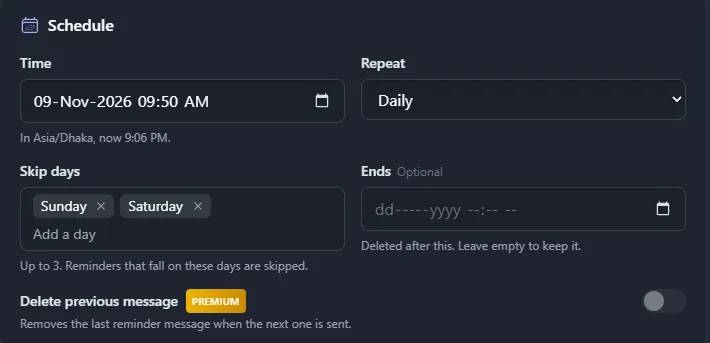
Skip days let a recurring reminder stay quiet on up to three weekdays. When a run falls on a skip day, nothing is posted and the reminder simply moves on to its next run. Nothing else about the reminder changes.
Skip days are checked in the server timezone, so Sunday means Sunday where your community is, even if the bot's servers are somewhere else.
Set skip days
Weekdays only
/reminder add reason: Daily check-in time: 9am repeat_interval: Daily skip_day: Saturday skip_day2: Sunday
- In Discord, use skip_day, skip_day2 and skip_day3.
- To change them later, run
/reminder editand click Edit Skip Days. Select up to three days, or none to clear them. - On the dashboard, use the Skip days field in the Schedule section.
Examples
| Goal | Repeat | Skip days |
|---|---|---|
| Workdays only | Daily | Saturday, Sunday |
| Every day except Sunday | Daily | Sunday |
| Every 12 hours, but not on weekends (Premium) | Custom 12h | Saturday, Sunday |
| School days, but not Fridays | Daily | Friday, Saturday, Sunday |
Reminders on specific days only
Skip days remove up to three days. To post on only two or three specific days, for example Monday, Wednesday and Friday, create one Weekly reminder for each day instead:
- Weekly reminder with time
monday 6pm - Weekly reminder with time
wednesday 6pm - Weekly reminder with time
friday 6pm
Keep in mind that each one counts toward your reminder limit.
Things to know
Questions
How many skip days can I set?
Up to three per reminder.
Can I skip a specific date, like a holiday?
Not directly. Pause the reminder before the holiday with /reminder pause and resume it afterwards.
Does a skipped run count as missed?
No. The reminder just moves to its next scheduled run, as if that day was not in the schedule.