
Embed Customization
Customize Reminder Pro embeds: title, color, image, thumbnail, footer and timestamp, with markdown tips, limits and supported image formats.
On this page
Embed parts
Every reminder is posted as a Discord embed: a card with a colored edge. Only the reason is required. Everything else is optional and can be added when you create the reminder or later.
| Part | Option | Edit button | Limit |
|---|---|---|---|
| Main text | reason | Edit Reason | 4000 characters |
| Heading | title | Edit Title | 256 characters |
| Edge color | color | Edit Color | Presets, or any hex code when editing |
| Large image | image | Edit Image | 10 MB |
| Corner image | thumbnail | Edit Thumbnail | 10 MB |
| Bottom text | footer | Edit Footer | 2048 characters |
| Send time | timestamp | Toggle Timestamp | On or off |
Title and reason
Use the title for a short headline like Weekly Meeting and the reason for the details. The reason supports all the markdown that Discord supports. A few examples:
| You write | Result |
|---|---|
**Starts at 8 PM** | Bold text |
*optional* | Italic text |
- Bring snacks | A bullet point |
[Join here](https://example.com) | A clickable link |
<t:1767225600:R> | A live countdown, in each member's local time |
Colors
/reminder add offers 25 preset colors, from Red and Gold to Teal and Indigo. For an exact color, run /reminder edit, click Edit Color and enter a hex code such as #FF5733, or use the color field on the dashboard.
Tip: use one color per type of reminder, for example green for events and red for deadlines, so members can tell them apart at a glance.
Images and thumbnails
Upload an image for a large banner below the text, and a thumbnail for a small picture in the top right corner.
- Formats: PNG, JPG, JPEG, WEBP, GIF, HEIC and HEIF.
- Maximum size: 10 MB.
- Uploaded images are stored by Reminder Pro, so they keep working even if the original message is deleted.
- Remove an image by clicking Edit Image and leaving the field empty, or with Remove Image on the dashboard.
Preview
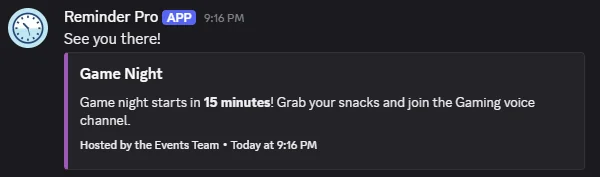
Click Preview & Edit after creating a reminder, or run /reminder edit, to see the exact message. The dashboard editor shows a live preview that updates as you type. This is how a reminder with a title, bold text, footer and timestamp looks once it is posted:
Questions
Can I use a custom hex color?
Yes. Use Edit Color in /reminder edit, or the color field on the dashboard. /reminder add itself offers 25 presets.
Why was my image rejected?
It is probably larger than 10 MB or not one of the supported formats: PNG, JPG, JPEG, WEBP, GIF, HEIC or HEIF.
Can I send a reminder without an embed?
Every reminder includes an embed with the reason. Use message_content for text that appears above it as a normal message.