
Viewing & Editing Reminders
List every reminder in your Discord server with /reminder list and change any part of a reminder with /reminder edit in Reminder Pro.
List reminders
Command
/reminder list
The list shows five reminders per page with their ID, channel, next send time, repeat interval and skip days. Use Previous and Next to page through, the refresh button to reload, and Select a reminder to edit to open one.
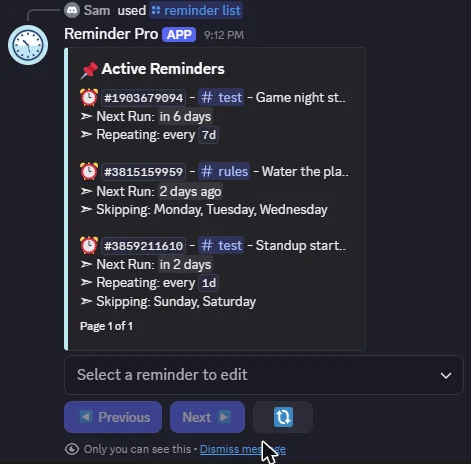
/reminder list with three reminders.Reminder IDs
Every reminder has an ID, like #1903679094. Commands that take a reminder_id suggest your reminders as you type, so you rarely need to copy one. For pause and resume you can also search by the reminder text.

Edit a reminder
Command
/reminder edit reminder_id: 12345678
The bot shows a preview of the reminder with these buttons:
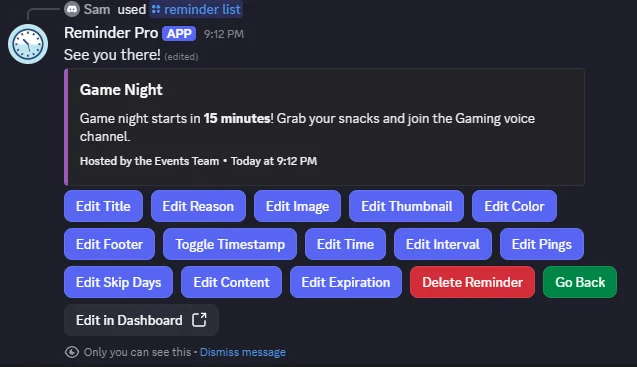
| Button | What you can change |
|---|---|
| Edit Title | The embed title. Leave empty to remove it. |
| Edit Reason | The main text |
| Edit Image / Edit Thumbnail | Upload a new image, or leave empty to remove it |
| Edit Color | Any hex color, like #FF5733 |
| Edit Footer | The footer text |
| Toggle Timestamp | Show or hide the send time |
| Edit Time | The next send time, in any time format |
| Edit Interval | The repeat interval. Leave empty to make it one-time. |
| Edit Pings | Up to four roles or members |
| Edit Skip Days | Up to three weekdays |
| Edit Content | The message_content text |
| Edit Expiration | The expiration. Leave empty to remove it. |
| Delete Reminder | Deletes the reminder |
| Close Menu / Go Back | Closes the editor, or goes back to the list |
| Edit in Dashboard | Opens the reminder on the web dashboard |
Each change is saved immediately and the preview updates, so you can make several changes in a row.
What you cannot edit in Discord
The channel cannot be changed from Discord, and delete_previous is set when the reminder is created. Use the dashboard to change the channel or the delete previous option, or create the reminder again.
Questions
Who can edit reminders?
Members with Manage Server and members with a staff role.
Can I edit a reminder that was created on the dashboard?
Yes. Reminders created anywhere can be edited in Discord or on the dashboard.
I changed the time but the reminder still fires at the old time. Why?
Check that the new time was understood correctly in the server timezone. Run /reminder list to see the next send time.