
Premium
Reminder Pro Premium explained: free vs premium limits, how to subscribe on Patreon and activate premium on your Discord server, moving premium, and what happens when it ends.
On this page
1. Subscribe
Join the Reminder Pro Premium tier on Patreon.
2. Link Discord to Patreon
- 1Open Patreon's Discord connection and connect your account.
- 2Check that you are logged in to the right Discord account in your browser. Premium is tied to the account you connect.
- 3Wait up to 2 minutes for the subscription to reach Reminder Pro.
3. Activate on your server
Command
/premium activate
- Run it in the server you want to upgrade.
- If your subscription has not arrived yet, click Refresh & Activate after a minute.
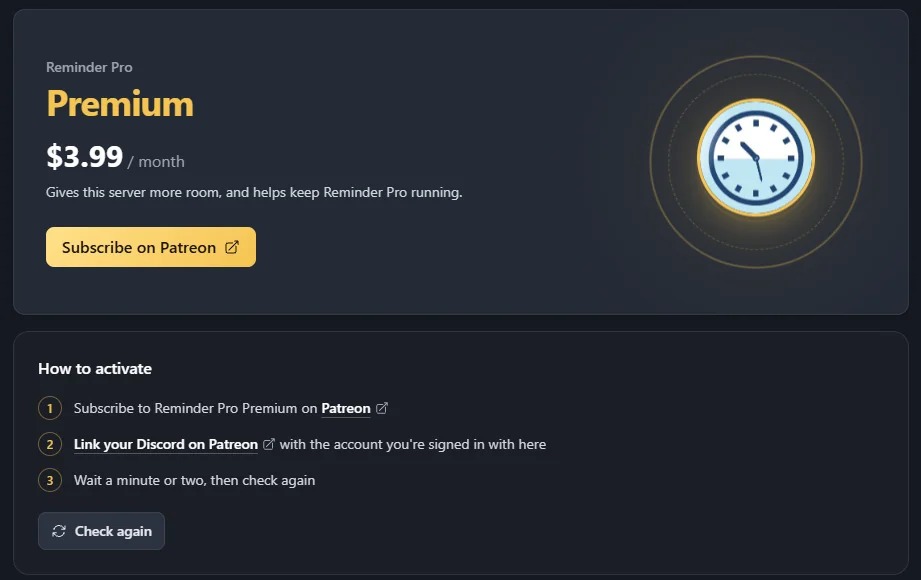
- Or open the Premium page on the dashboard. It walks you through the same steps and has a Check again button.
- Check with
/premium status. See all perks with/premium perks.
Premium on the dashboard
Questions
I subscribed but /premium activate says I need premium. What now?
Your Patreon is probably linked to a different Discord account, or the link has not arrived yet. Connect Discord in Patreon settings, wait up to 2 minutes and click Refresh & Activate. If it still fails, open a ticket in the support server.
Can I use one subscription on two servers?
No. One subscription activates one server at a time. You can move it with /premium activate.
Who can activate premium?
Anyone with an active subscription. The command does not require Manage Server.