
Permissions & Staff Roles
Which Discord permissions Reminder Pro needs, who can use each command, and how to let moderators manage reminders with staff roles.
Permissions the bot needs
Reminder Pro does not need Administrator. In every channel where it posts reminders it needs:
- View Channel, to see the channel.
- Manage Webhooks, to create the Reminder Pro webhook that posts the reminders.
If Manage Webhooks is missing, /reminder add fails with "Failed to create a webhook". Private channels are the usual cause because the bot role is not added to them automatically.
- 1Right click the channel and choose Edit Channel.
- 2Open Permissions and add the Reminder Pro role.
- 3Allow View Channel and Manage Webhooks, then save.
Who can use which command
| Commands | Who can use them |
|---|---|
All /reminder commands | Members with Manage Server, or with a staff role |
/settings timezone set and view | Members with Manage Server, or with a staff role |
/settings staff_role add, remove, list | Members with Manage Server only |
/premium activate, status, perks | Everyone |
/help and /ping | Everyone |
| Web dashboard | Members with Manage Server or Administrator, or with a staff role |
All commands work inside servers only. They are disabled in direct messages. Replies from the bot are private (only you can see them), so you can manage reminders in a busy channel without spamming it.
Staff roles
A staff role lets its members create and manage reminders without the powerful Manage Server permission. Typical examples are Moderators, Event Hosts or Teachers.
| Command | What it does |
|---|---|
/settings staff_role add role: | Gives the role access to reminder and timezone commands |
/settings staff_role remove role: | Removes that access |
/settings staff_role list | Shows every staff role |
Example
/settings staff_role add role: @Event Hosts
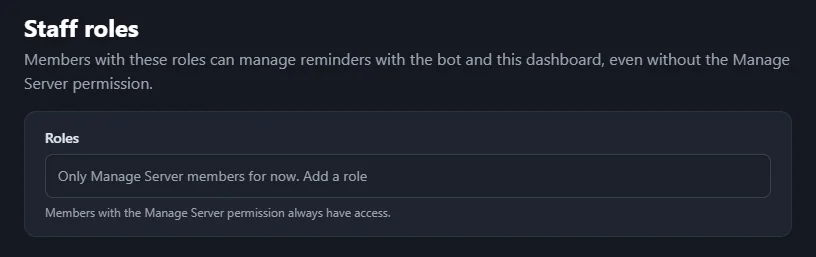
You can also manage staff roles in Settings > Staff roles on the web dashboard.
Questions
Does Reminder Pro need Administrator?
No. View Channel and Manage Webhooks in the channels where it posts are enough.
Can a staff role member manage staff roles?
No. Only members with Manage Server can add or remove staff roles.
Can I give everyone access to reminder commands?
Yes. Add @everyone as a staff role. Only do this on small, trusted servers, because anyone could then edit or delete reminders.