
Time Formats
Every time format Reminder Pro accepts: clock times, dates, weekdays, relative durations and ISO timestamps, with examples, limits and the most common mistakes.
On this page
Rules to remember
The time option accepts plain English times and short durations. You do not need to pick from a calendar. Type what you mean and the bot works out the exact moment. Five rules cover almost everything:
- Clock times are read in the server timezone.
- Dates are month first:
03/04is March 4. - Without am or pm, times are 24 hour:
3:00is 3 AM,15:00is 3 PM. - A date without a year uses the current year.
- A date without a time means 00:00 (midnight at the start of the day).
All formats
| Type | Examples | Meaning |
|---|---|---|
| Time today | 3pm, 9:30am, 15:45 | Later today at that time |
| Date and time | 01/15 9pm, 01/15 21:30, 4 May 12:00 | That date this year |
| Date, time and year | 01/15 9pm 2027, 01/15 21:30 2027, 4 May 2027 12:00 | That exact date |
| Date only | 01/15, 01/15 2027, 4 May, 4 May 2027 | That date at 00:00 |
| Weekday | monday 3pm, fri 9:30am, saturday 20:00 | The next time that weekday comes around |
| Next weekday | next monday 15:00 | One week after the coming Monday |
| Relative | 45m, 2h, 3h 30m, 1d 12h, 5d 2h 30m 15s | That long from now |
| ISO 8601 | 2026-01-02T15:37:00.000Z | That exact moment in UTC |
Month names can be short or long (4 May, 4 September, 4 sep). Weekdays can be short too (mon, tues, fri).
Relative time units
| Unit | Accepted spellings |
|---|---|
| Days | d, day, days |
| Hours | h, hr, hrs, hour, hours |
| Minutes | m, min, minute, minutes |
| Seconds | s, sec, second, seconds |
Combine units in any order, separated by spaces: 1d 6h, 2h 30m, 90m and 36h all work.
Where these formats are used
- time in
/reminder addand Edit Time: any format above. - custom_interval and Edit Interval: relative durations, like
12hor2d 6h. - expires_after and Edit Expiration: any format above, like
30dor12/30 2029.
Check how your time was understood
The confirmation after /reminder add shows the first send time as a Discord timestamp, both as a countdown ("in 3 hours") and as a full date in your own local time. If it is not what you meant, fix it right away with Preview & Edit and Edit Time.
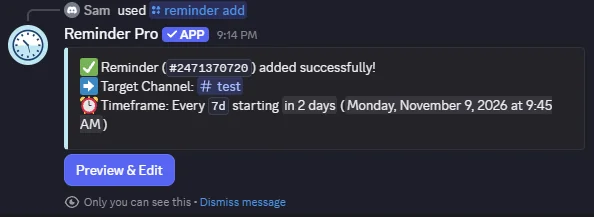
monday 9:45am understood as Monday, November 9 at 9:45 AM.Scheduling limits
Free servers can schedule the first send and the expiration up to 7 days ahead. Premium servers have no limit, so they can schedule next year's events or yearly reminders. See Premium.
Common mistakes
| You typed | Problem | Type instead |
|---|---|---|
15/01 9pm | There is no month 15 | 01/15 9pm |
8am (in the afternoon) | 8 AM today has already passed | 10/31 8am |
01/15 (in October) | January 15 this year has passed | 01/15 2027 |
3:00 (meaning afternoon) | No am or pm, so it is 3 AM | 3pm or 15:00 |
1mo | Months are not a duration | A date, or the Monthly repeat |
tomorrow 9am | Words like tomorrow are not supported | A weekday (friday 9am) or a date |
Questions
Can I use 12 hour and 24 hour time?
Yes. Write 12 hour time with am or pm, like 9:30pm, or 24 hour time without it, like 21:30.
Are dates day first or month first?
Month first. 03/04 is March 4. Writing the month name, like 4 Mar, avoids any confusion.
Which timezone are reminder times in?
Your server timezone, set with /settings timezone set. Members still see the send time in their own local time inside Discord.