
Web Dashboard
Manage Discord reminders from your browser with the Reminder Pro web dashboard. Log in with Discord, pick a server, and configure timezone, staff roles and bot appearance.
Why use the dashboard
Slash commands are fast, but long reminders with images, colors and pings are easier to build with a form. The Reminder Pro dashboard gives you a live preview, a full list of reminders with search and filters, and every server setting in one place. It works on desktop and phone browsers.
Logging in
- 1Go to dash.reminderpro.net.
- 2Click Login with Discord and approve. The dashboard only reads your profile and server list.
- 3Pick a server from Your servers.
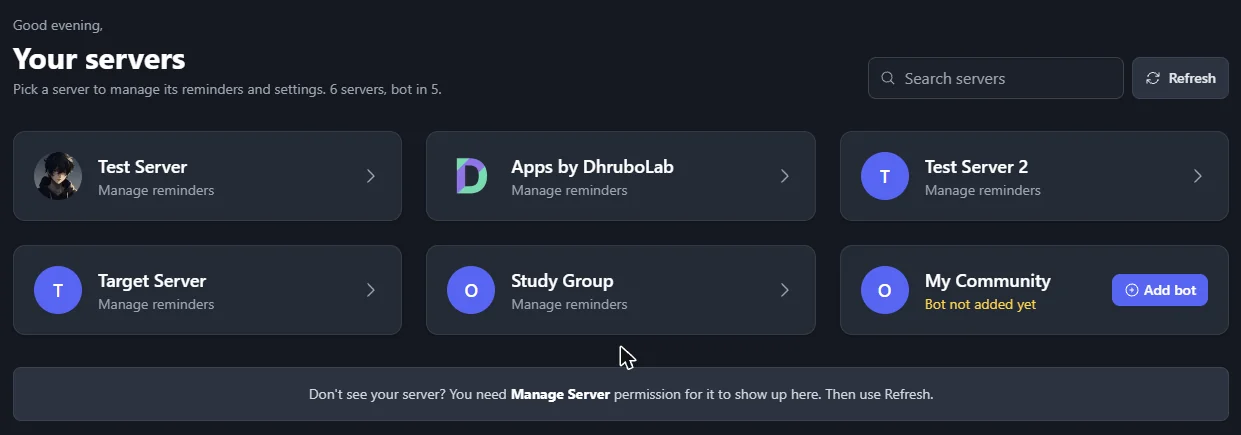
Server list
- Shows servers where you have Manage Server or Administrator, plus servers where you have a staff role.
- Use Search servers to filter a long list, and Refresh if a server or permission is new.
- If the bot is not in a server yet, you get an Add Bot to Server button.
Tabs
| Tab | Use it to |
|---|---|
| Reminders | Create, preview, edit, pause and delete reminders |
| Settings | Timezone, daylight saving, staff roles and bot appearance (below) |
| Premium | See premium status and activate premium |
At the bottom of the sidebar you can switch between the Glass and Solid themes. On phones, open the sidebar with the menu button. The Get it on Google Play button links to Reminder Pro: App with Alarm, a separate Android app for personal reminders that works without the Discord bot.
Settings tab
| Setting | What it does | Plan |
|---|---|---|
| Timezone | Search by city or UTC offset. See Server Timezone | Free |
| Daylight saving | Move repeating reminders 1 hour after a clock change. See Daylight Saving Time | Free |
| Staff roles | Roles that may manage reminders in Discord and on the dashboard. See Permissions | Free |
| Bot appearance | Custom name (2 to 80 characters) and avatar for all reminders. See Custom Bot Name & Avatar | Premium |
Changes to the timezone, staff roles and bot appearance are not applied until you save them. When something changed, a bar appears at the bottom of the screen with Save changes and Discard. If you try to leave the page with unsaved changes, the dashboard asks first. Daylight saving buttons act immediately.
The Daylight saving page also shows when your timezone last changed its clocks and when it will next change them, so you know when to use it.
Members with a staff role see the Staff roles page as read only. Only members with Manage Server can change it.
Same data as the bot
The dashboard and the bot share the same reminders and settings, with the same free and premium limits. A change in one shows up in the other right away.
Questions
Is the dashboard free?
Yes. Every feature you can use in Discord is also available on the dashboard, with the same limits.
Why can't I see my server?
You need Manage Server, Administrator or a staff role in that server. Click Refresh after getting the permission.
Can staff role members use the dashboard?
Yes. They can manage the server's reminders. Only members with Manage Server can change the staff roles.