
Pings & Mentions
Notify roles, members and @everyone with Reminder Pro reminders. Learn the ping options, message_content, member pings on the dashboard, and why mentions inside an embed never ping.
On this page
Ping options
/reminder add has four ping options: ping, ping_2, ping_3 and ping_4. Each accepts a role or a member. Choose @everyone to notify the whole server.
Command
/reminder add reason: Raid starts in 15 minutes time: friday 7:45pm repeat_interval: Weekly ping: @Raiders ping_2: @Officers
Change pings later with Edit Pings, which lets you pick up to four roles or members.
Message layout
A reminder message is built in this order:
- 1Mentions from the ping options.
- 2Your message_content text.
- 3The embed with title, reason, images and footer.
Pings and message_content together can be up to 2000 characters.
Why mentions in the reason do not ping
The reason is shown inside an embed. Discord displays mentions inside embeds but never sends notifications for them. That is a Discord rule, not a bot setting. If you type @Raiders into the reason, the reminder looks right but nobody gets pinged.
Reminder Pro shows a tip when it notices a mention inside the reason. Move it into a ping option or into message_content, which is normal message text and does notify.
Mentions in message_content
Use message_content for @here, for a fifth mention, or for a mention in the middle of a sentence. Mentions use Discord's format:
| Mention | Format | Example |
|---|---|---|
| A member | <@USER_ID> | <@123456789012345678> |
| A role | <@&ROLE_ID> | <@&987654321098765432> |
| Online members | @here | @here |
| Everyone | @everyone | @everyone |
Example
/reminder add reason: Stream starts soon time: saturday 7pm repeat_interval: Weekly message_content: @here we go live in 1 hour!
Find a user or role ID
- 1In Discord, open User Settings > Advanced and enable Developer Mode.
- 2Right click a member and choose Copy User ID, or right click a role in Server Settings and choose Copy Role ID.
- 3Paste it into the format above.
Pings on the dashboard
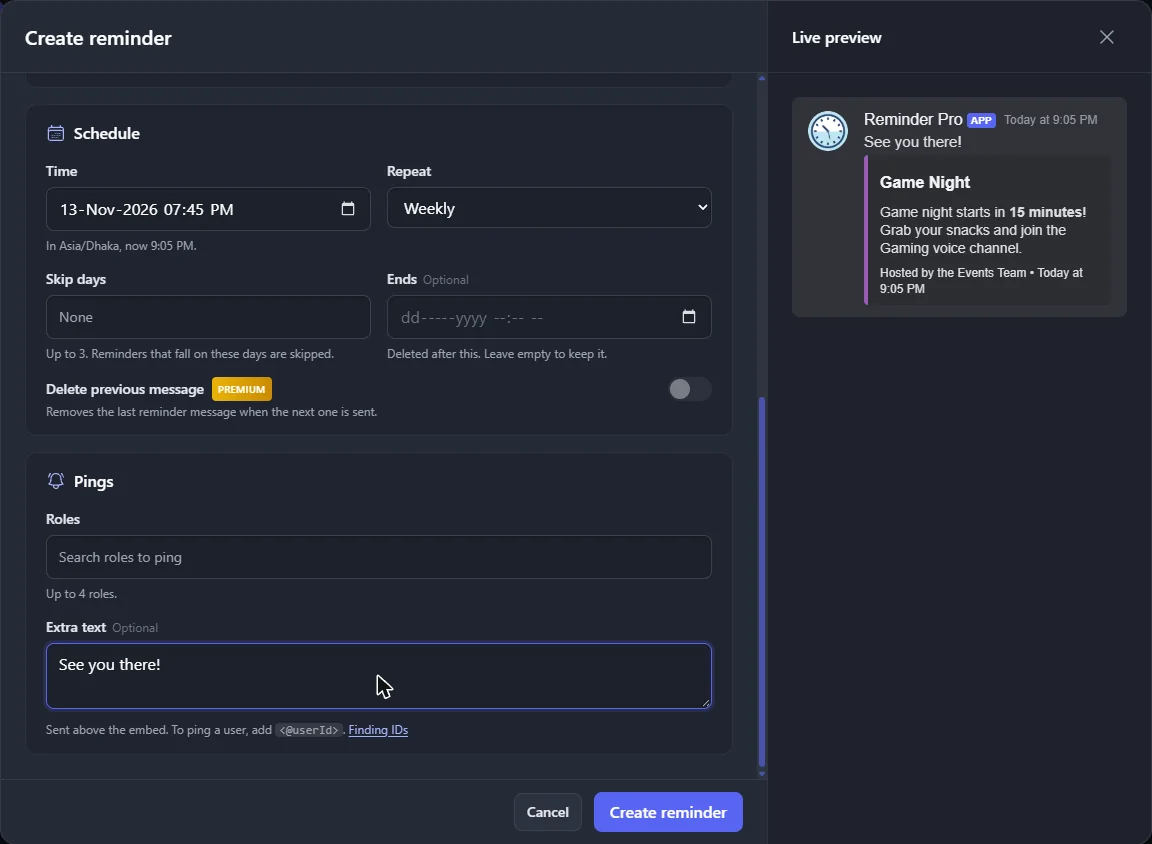
The dashboard editor has a Pings section: Roles for up to four roles, and Extra text for anything else. To ping a member, add <@USER_ID> to Extra text.
Questions
Can I ping @here?
Yes, by writing @here in message_content. The ping options accept roles, members and @everyone.
How many people or roles can one reminder ping?
Four through the ping options, plus any extra mentions you write in message_content.
Why did my reminder show the mention but nobody got notified?
The mention was inside the reason, which is part of the embed. Embeds never notify. Use a ping option or message_content.